Contenu
Votre bibliothèque de liens d'affiliation s'enrichit plus vite que vous ne le pensez. Un jour, vous ajoutez un lien ici et là pour un article ou deux, et le lendemain, vous gérez un catalogue complet de partenariats, de promotions et de recommandations de produits dont dépend l'ensemble de votre stratégie de contenu.
Cent liens se transforment en trois cents... trois cents se transforment en mille... et soudain, vous ne pouvez plus trouver le lien Amazon que vous avez utilisé dans votre article le plus lu sans avoir à le chercher pendant 30 minutes.
C'est à ce moment-là que la catégorisation des liens cesse d'être un avantage et devient l'élément qui maintient l'ensemble de votre stratégie d'affiliation.
Au fil des ans, j'ai vu des affiliés utiliser les catégories de liens de quelques façons très spécifiques - et ceux qui s'y intéressent sont ceux qui peuvent réellement gérer, suivre et mettre à l'échelle des milliers d'URL sans perdre des heures à fouiller dans leur tableau de bord ou perdre des commissions sur des offres dont ils ont oublié l'existence.
Pourquoi organiser vos liens d'affiliation avec les catégories de liens de ThirstyAffiliates ?
A l'intérieur de ThirstyAffiliates, chaque lien que vous créez peuvent être affectés à une ou plusieurs catégories, et ces catégories apparaissent à côté de vos liens dans votre tableau de bord.
Vous pouvez filtrer par catégorie pour obtenir tous les liens qui y sont associés, renommer ou restructurer les catégories en fonction de l'évolution de votre entreprise et déplacer les liens entre les dossiers au fur et à mesure que les offres changent.
Quelques caractéristiques essentielles méritent d'être rappelées avant d'aborder les stratégies :
- Catégories illimitées. Il n'y a pas de limite au nombre de catégories que vous créez. Que vous en ayez besoin de 5 ou de 50, les catégories de liens de ThirstyAffiliates s'adaptent à votre collection.
- Sous-catégories imbriquées. Vous pouvez créer des catégories parentes avec autant de sous-catégories que vous le souhaitez. C'est là que se trouve la véritable organisation, et la plupart des stratégies ci-dessous s'appuient sur elle.
- Filtrage en un clic. À partir de votre tableau de bord des liens principaux, vous pouvez filtrer l'ensemble de votre bibliothèque par catégorie ou sous-catégorie en un seul clic.
- Affectation multi-catégories. Un même lien peut appartenir à plusieurs catégories à la fois. Cela signifie qu'un lien Amazon promouvant une idée de cadeau pour les fêtes de fin d'année peut se trouver à la fois dans votre catégorie “Associés Amazon” et dans votre catégorie “Saisonniers” sans qu'il y ait de doublon.
L'outil lui-même est simple. Ce qui fait la différence, c'est l'intention avec laquelle vous le configurez. Ceci étant dit, voici 8 des façons les plus intelligentes d'organiser vos liens d'affiliation dans ThirstyAffiliates.
8 façons de catégoriser vos liens d'affiliation dans ThirstyAffiliates
1. Organiser par type de produit
Le regroupement par type de produit permet d'organiser vos liens autour des éléments suivants ce qu'est réellement le produit - biens physiques, cours, livres, modèles, abonnements, etc.
Si vous promouvoir dans plusieurs secteurs verticaux, C'est la couche qui empêche votre tableau de bord de devenir un fouillis de liens sans lien clair entre eux. Au lieu de faire défiler un livre de cuisine, un cours et un gadget de cuisine alignés les uns à côté des autres, tout se trouve dans une catégorie qui vous indique de quoi il s'agit en un coup d'œil.
Imaginons que vous rédigiez un article sur vos outils préférés pour préparer les repas de la semaine. Vous ouvrez ThirstyAffiliates, vous filtrez sur votre catégorie “Gadgets de cuisine” et tous les liens pertinents sont là. Pas besoin de défiler, de chercher, de deviner quel lien Amazon est celui de l'autocuiseur que vous avez recommandé il y a six mois.
Il est également plus facile de repérer les lacunes, par exemple lorsque vous vous rendez compte que vous avez vingt liens vers des gadgets de cuisine, mais seulement trois vers des livres de cuisine, ce qui peut vous donner une idée de l'orientation de votre contenu ou de la marge de manœuvre dont vous disposez pour élargir votre gamme de recommandations de produits.
2. Regroupement par marque ou réseau d'affiliation
Si le type de produit est le ce que, celui-ci est le qui. Regrouper par marque ou par réseau, c'est créer une catégorie pour chaque partenaire important avec lequel vous travaillez: Amazon Associates, ShareASale, Impact, Awin, CJ, programmes de marques individuelles, partenariats directs, etc.
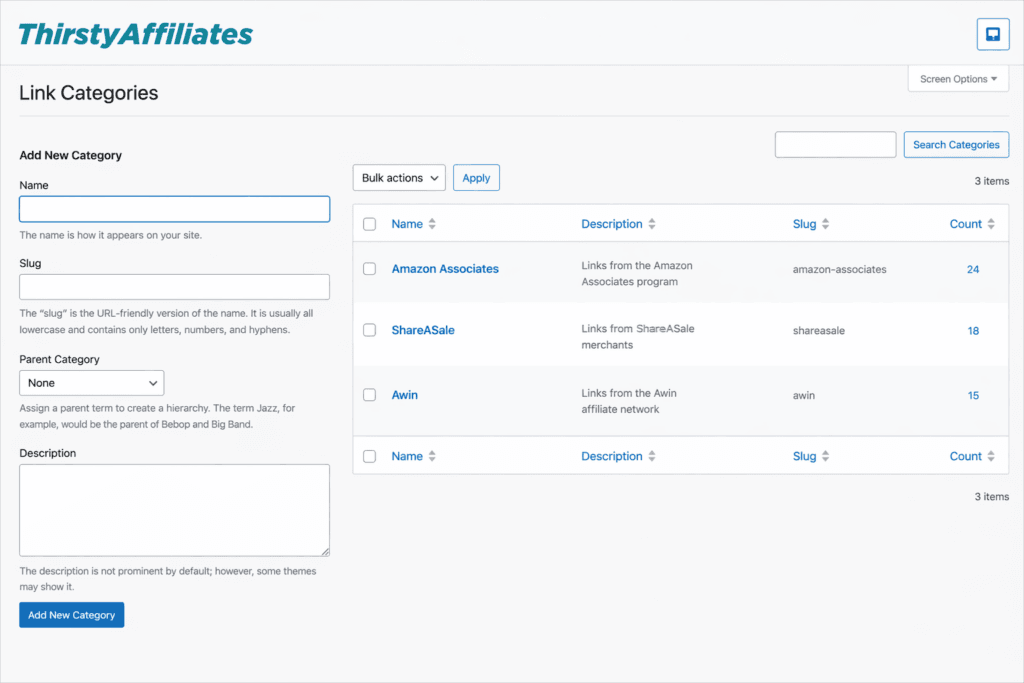
C'est ici que les sous-catégories imbriquées de ThirstyAffiliates’ gagnent leur place. Je suggère de considérer le réseau comme la catégorie mère et les marques individuelles comme des sous-catégories. Ainsi, ShareASale devient une catégorie mère, et chaque marchand ShareASale dont vous faites la promotion vit à l'intérieur de cette catégorie.
Pourquoi s'en préoccuper ? Parce que délais de paiement, les fenêtres de cookies, et structures des commissions varient d'un réseau à l'autre. Et lorsque l'un de ces éléments change, les choses peuvent rapidement déraper.
Imaginez la situation suivante : vous vous connectez un matin et vous découvrez que.. :
- Amazon Associates vient de réduire les taux de commission dans une catégorie que vous promouvez fortement.
- Une marque à laquelle vous envoyez du trafic depuis deux ans met fin à son programme sans même un e-mail.
- Votre paiement mensuel ShareASale arrive $400 plus léger que prévu, et vous n'avez aucune idée du marchand responsable.
Sans catégories de marque ou de réseau, vous êtes obligé de chercher lien par lien pour essayer de reconstituer les dommages. Avec ces catégories, vous pouvez filtrer par partenaire affecté, faire apparaître tous les liens qui y sont liés en un seul clic et commencer à prendre des décisions - quel contenu mettre à jour, quels liens échanger, quels partenaires adapter à votre stratégie.
3. Séparer les liens permanents des liens saisonniers
Il s'agit de l'un des fractionnements les plus précieux que vous puissiez intégrer à votre système de catégories, et il est rentable dès que le calendrier commence à changer.
- Liens permanents indiquent des produits qui vendre tout au long de l'année avec une pertinence constante - vos outils de tous les jours, vos recommandations de base et vos favoris de toujours.
vs.
- Liens saisonniers sont liées à une période spécifique de l'année - guides de cadeaux pour les fêtes, équipement pour l'été, choix pour la rentrée scolaire, récapitulatifs des bonnes affaires du vendredi noir.
Lorsqu'ils sont regroupés dans le même panier, vos liens saisonniers sont ignorés alors qu'ils devraient être en train de s'échauffer, ou ils restent actifs et gênants dans le contenu de la saison morte. En les répartissant dans des catégories distinctes, vous savez où aller lorsqu'il est temps de préparer la saison suivante.
Par exemple, chaque printemps, je consulte ma catégorie “saisonnier” et je la passe en revue comme une liste de contrôle. Je peux ainsi voir d'un coup d'œil :
- les liens qui ont besoin d'un contenu frais autour d'eux pour se préparer au trafic estival;
- les produits qui ont été remplacés par des versions plus récentes que je devrais échanger ;
- les marques qui proposent déjà des offres pour le début de l'été et sur lesquelles je peux prendre de l'avance.
Ainsi, au moment des vacances d'été, mon contenu saisonnier est déjà rafraîchi et je peux profiter des vacances scolaires avec mes enfants pendant que mon contenu a été optimisé pour gagner des commissions en arrière-plan.
4. Organiser les promotions en fonction du calendrier
Les promotions sensibles au temps sont les événements à courte fenêtre qui se déroulent pendant les saisons - les ventes flash, les lancements de produits et les offres à durée limitée avec une date de début et une date de fin précises.
Ils méritent d'être classés dans une catégorie à part parce qu'ils fonctionnent selon une chronologie complètement différente de celle de tous les autres éléments de votre bibliothèque. Un lien saisonnier reste pertinent pendant des mois. Une promotion urgente peut n'être en ligne que pendant 48 heures.
À l'intérieur de cette catégorie, vous pouvez subdiviser en sous-catégories selon le type de promotion sensible au facteur temps :
- Ventes flash (offres de 24 heures, ventes de fin de semaine, ventes de stocks limités)
- Lancement de produits liée à une fenêtre de diffusion spécifique
- Promotions des partenaires à durée limitée (codes d'exclusivité, contrats de collaboration à court terme)
- Événements flash pour les fêtes de fin d'année (Black Friday, Cyber Monday, Prime Day)
C'est en fin de compte cette clarté qui est la plus payante. Lorsqu'une promotion se termine, vous n'êtes pas en train de parcourir votre bibliothèque de liens en essayant de vous souvenir de ce que vous avez promu.
Vous consultez la catégorie de promotion, vérifiez chaque lien qu'elle contient et effectuez le nettoyage en une seule fois
- en éliminant par rotation les offres périmées, en archivant les liens qui ne seront pas réutilisés et en signalant les liens encore vivants qui doivent être retirés maintenant que la fenêtre est fermée.
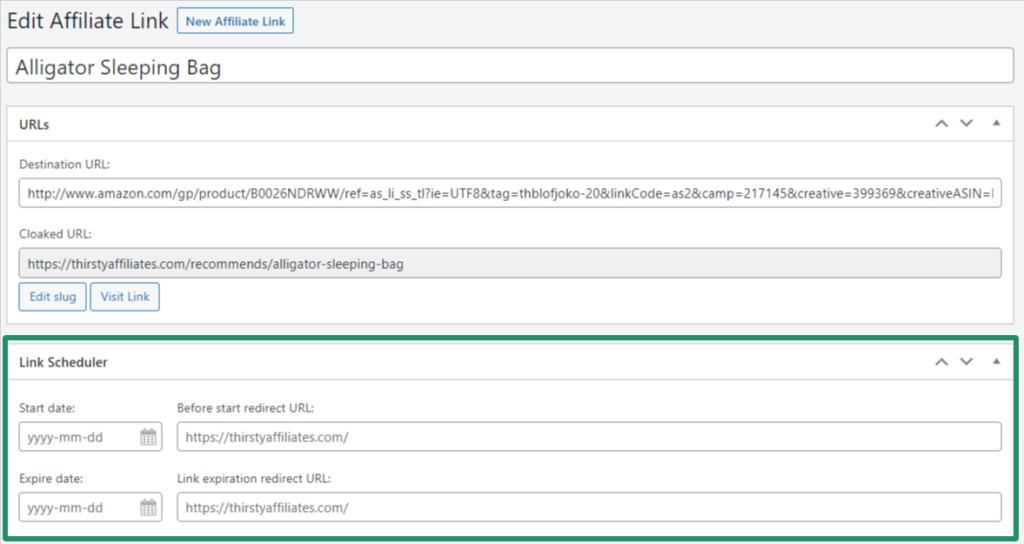
💡ThirstyAffiliates Contrôle de l'outil : Si vous organisez régulièrement des promotions sensibles au facteur temps, assurez-vous que vous disposez de l'information nécessaire. Module de planification des liens activé. À l'intérieur de chaque lien individuel, vous définissez une date de début, une date d'expiration et l'endroit vers lequel le lien doit pointer avant il est mis en ligne et après il expire.
5. Créer une catégorie pour les offres expirées ou en pause
En ce qui concerne les promotions sensibles au facteur temps, il existe une catégorie de suivi naturelle qui va de pair avec elles : les offres expirées et interrompues.
Chaque bibliothèque de liens d'affiliation accumule des poids morts au fil du temps :
- Produits abandonnés
- Les offres qui ont expiré à la fin d'une fenêtre promotionnelle
- Partenariats en pause
- Codes de réduction qui ne fonctionnent plus
En laissant ces liens disséminés dans vos catégories principales, vous finissez par envoyer vos lecteurs vers des pages cassées ou, pire, par promouvoir activement un lien qui a cessé de rapporter il y a six mois.
Il ne s'agit pas seulement d'un problème de revenus, mais aussi d'un problème de confiance. Les lecteurs qui cliquer sur un lien d'affiliation cassé ou mort Le fait qu'ils le remarquent nuit à la crédibilité que vous vous êtes forgée.
La création d'une catégorie dédiée “Expiré / En pause” vous permet de conserver tout ce qui n'est plus activement rémunérateur. Au lieu de supprimer purement et simplement un lien (ce qui peut poser problème si l'offre revient ou si vous avez besoin de référencer d'anciennes données de performance), vous le retirez de vos catégories actives et le placez dans cette catégorie.
💡ThirstyAffiliates Contrôle de l'outil : Ne vous arrêtez pas à votre tableau de bord - vérifiez également votre contenu. Organiser les liens brisés dans une catégorie ne représente que la moitié du nettoyage. L'autre moitié consiste à s'assurer que ces liens morts ne vivent pas encore à l'intérieur de vos articles et pages publiés.
Pour cela, activez la fonction Module de vérification automatique 404. Il analyse discrètement chaque lien d'affiliation sur votre site et signale tous ceux qui envoient un 404 dans un rapport dédié sous la rubrique ThirstyAffiliates → Rapports → 404 Checker.
6. Grouper les liens liés à une remise ou à un coupon
Les liens bénéficiant d'une remise convertissent mieux. Cette information n'est pas nouvelle. Ce qui est moins évident, c'est que les affiliés perdent souvent de vue les liens auxquels est attaché un coupon, en particulier lorsque le coupon est assorti d'une date d'expiration ou d'un plafond pour le nombre de fois où il peut être échangé.
La création d'une catégorie dédiée aux liens liés à une remise ou à un coupon vous permet de disposer d'une liste récurrente de vos opportunités d'affiliation à fort taux de conversion en un seul endroit. À l'intérieur de cette catégorie, vous pouvez établir des sous-catégories en fonction du type de coupon :
- Codes de réduction en pourcentage (15% off, 25% off, etc.)
- Remises en fonction du montant ($10 de réduction, $50 de réduction sur votre première commande)
- Essai gratuit ou offres freemium
- Offres BOGO et des remises groupées
- Codes exclusifs qu'une marque vous a donné directement
Ces codes exclusifs sont généralement assortis d'une commission plus élevée, d'une fenêtre de cookie plus longue, ou des deux, et c'est le genre d'avantage que vous avez gagné en établissant une relation avec la marque. En les gardant dans leur propre sous-catégorie, vous ne sous-promouvez jamais les liens qui vous rapportent le plus.
C'est également la catégorie que je vérifierais avant de rédiger quoi que ce soit de promotionnel. Si je prépare un e-mail, un message social ou un contenu axé sur la vente, je veux savoir lesquels de mes liens sont actuellement assortis d'une incitation active, car ce sont ceux qui méritent d'être privilégiés.
7. Organiser par profil de lecteur
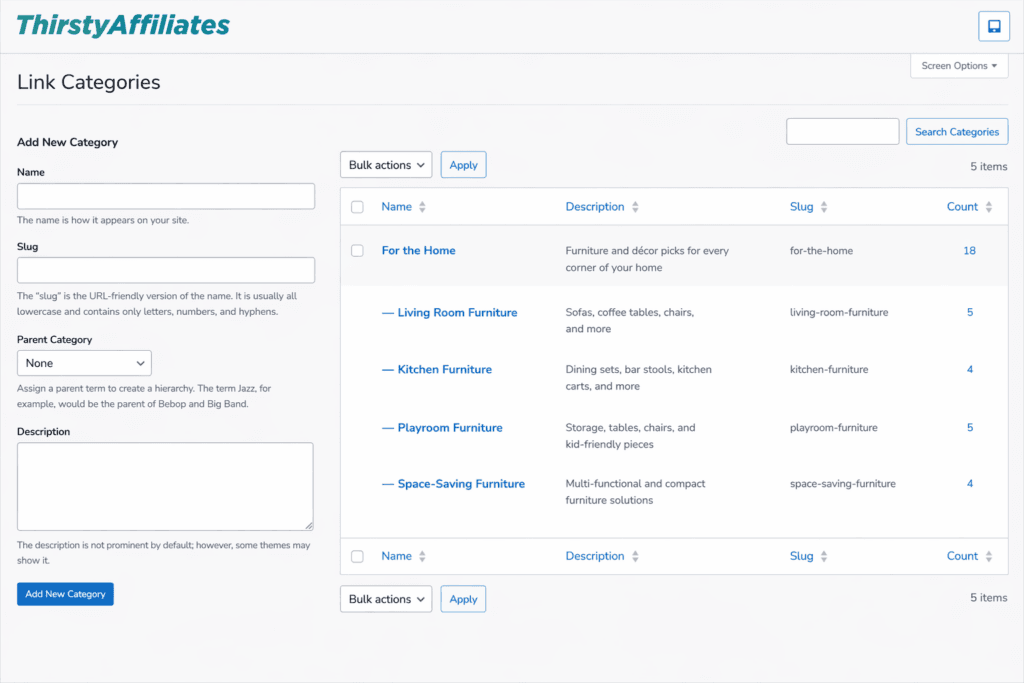
Organiser vos liens par profil de lecteur signifie les regrouper autour de le public auquel ils sont destinés. Il s'agit d'une catégorie qui reflète l'influence de votre public sur votre contenu et, par extension, les liens qui trouveront un écho auprès des lecteurs.
À l'intérieur de cette catégorie, vous pouvez sous-catégoriser les produits en fonction de leur nature. indicateurs de lecture Les critères les plus importants pour votre secteur d'activité. Quelques-uns qui fonctionnent pour presque toutes les activités d'affiliation :
- Niveau d'expérience - où se situe votre lecteur sur la courbe d'apprentissage (un bricoleur débutant ou un menuisier chevronné disposant d'un atelier complet)
- Stade de vie - la situation dans laquelle ils se trouvent (nouveaux parents, parents sans enfants, étudiants, retraités)
- Cas d'utilisation ou objectif - ce que votre lecteur essaie de réaliser (perdre du poids, être plus productif, économiser de l'argent, adopter des habitudes plus saines, mieux dormir)
- Echelon budgétaire - ce qu'ils sont prêts à dépenser (choix économiques, options de milieu de gamme, recommandations de prix élevés)
Le plus grand avantage de cette organisation nous ramène à l'alignement du contenu. Si je rédige un article destiné à des étudiants qui aménagent leur première chambre d'étudiant, je n'ai pas envie de passer au crible toute la collection de mon bureau à domicile pour trouver des liens qui s'y rapportent réellement... jeu de mots.
Cela permet également d'affiner votre stratégie de contenu au fil du temps. Lorsque vous pouvez voir d'un coup d'œil votre bibliothèque de liens ventilée par profil de lecteur, vous commencez à remarquer des schémas.
Par exemple, si vos recommandations de liens d'affiliation plus coûteux sont plus souvent cliquées que vos options plus économiques, cela peut vous indiquer que votre public penche un peu plus vers le haut de gamme - et vous pouvez y répondre.
8. Créer une catégorie “Top Performers
Il s'agit de l'une des catégories les plus pratiques que vous puissiez créer : une catégorie spécifique pour vos liens d'affiliation préférés - les plus remarquables qui gagnent leur place grâce à performance réelle, Il ne s'agit pas seulement d'un produit que l'on aime.
Considérez-le comme votre liste personnelle de liens que vous consultez lorsque vous écrivez, et ce qui fait qu'un lien est “le plus performant” dépend entièrement de vous - qu'il s'agisse de.. :
- Les plus hauts revenus de commission
- Meilleurs taux de conversion
- Les marques avec lesquelles vous entretenez des relations étroites
- Produits que vous utilisez personnellement depuis des années
Cette catégorie vous permet de gagner en rapidité. Lorsque vous rédigez un contenu et que vous devez insérer rapidement une recommandation, vous ne voulez pas avoir à peser douze options à chaque fois.
Vous voulez tirer parti d'une liste de liens dont vous savez déjà qu'ils sont dignes de confiance, fiables et qu'ils rapportent des commissions à chaque fois qu'ils apparaissent dans votre contenu.
Maintenant, la vraie astuce : vos liens les plus performants ne sont pas obligés de vivre uniquement dans cette catégorie. Comme je l'ai mentionné précédemment, vous pouvez les classer dans deux catégories, de sorte que le même lien puisse apparaître dans “Top Performers” et dans n'importe quelle autre catégorie que vous avez créée pour lui.
Le lien vers votre gadget de cuisine le plus performant peut se trouver à la fois dans “Top Performers”, “Tech Gadgets” et “Amazon Associates”. Vous bénéficiez ainsi de la rapidité d'une liste de référence sans avoir à retirer ces liens du reste de votre système d'organisation.
Conseils rapides pour que la catégorisation des liens fonctionne à long terme
Un système de catégorisation solide n'est pas une installation ponctuelle. C'est une habitude.
Si vous partez de zéro, choisissez trois ou quatre des catégories ci-dessus qui correspondent à votre activité actuelle et partez de là. Essayer de mettre en œuvre les huit catégories en même temps avant d'avoir le volume de liens qui les justifie conduit généralement à un système qui ressemble plus à un travail qu'à un soutien.
Quelques points à garder à l'esprit lors de la construction :
- Utilisez généreusement les sous-catégories de ThirstyAffiliates. Une catégorie mère avec cinq sous-catégories est presque toujours plus facile à gérer que six catégories indépendantes.
- Réexaminez la structure de vos catégories une fois par trimestre. Ce qui était logique lorsque vous aviez 50 liens peut s'avérer trop simple lorsque vous en avez 500.
- Ne pas trop catégoriser. Si une catégorie ne contient qu'un ou deux liens, elle a probablement sa place dans une autre sous-catégorie.
- Attribuez une catégorie à chaque nouveau lien au moment où vous le créez, et non plus tard. La pile “Je l'organiserai plus tard” est la raison pour laquelle chaque bibliothèque de liens d'affiliation se transforme en chaos.
Conclusion
En fin de compte, la catégorisation de vos liens d'affiliation n'est pas vraiment une question d'organisation pour le plaisir.
Il s'agit de vous donner de la visibilité, du contrôle et la possibilité de prendre des décisions intelligentes sans passer un après-midi à fouiller dans votre tableau de bord pour les trouver.
Qu'il s'agisse de profiter d'une promotion pour le Black Friday sans perdre de vue les liens qui y sont liés, de rafraîchir votre contenu saisonnier avant que le trafic n'augmente ou de retrouver tous les liens liés à un partenaire dont le programme vient d'être modifié, les catégories permettent de transformer votre bibliothèque de liens d'une pile en un système.
Une fois que votre tableau de bord ThirstyAffiliates reflète la façon dont vos promotions d'affiliés se déroulent réellement, le reste suit :
- Vous écrivez plus rapidement parce que le bon lien est toujours à portée de clic.
- Vous repérez des schémas de performance que vous n'auriez pas remarqués sur une simple liste.
- Et vous augmentez vos revenus d'affiliation sans qu'une bibliothèque de liens encombrante et désordonnée ne vous ralentisse à chaque fois que vous vous asseyez pour écrire.
Quel est le degré de désordre de votre bibliothèque de liens d'affiliation sur une échelle de 1 (“tout a une place”) à 10 (“j'ai un lien appelé ‘misc-stuff-2’ et je ne sais pas ce qu'il contient”) ? Dites-le-moi dans les commentaires, sans jugement.