Contenido

Llevo bastante tiempo gestionando blogs y enlaces de afiliación y, hoy en día, no necesito entrar en cinco redes de afiliación diferentes para conseguir un enlace de afiliación mientras escribo un blog.
Tampoco me verás buscando números de identificación de productos. Y definitivamente no me verás copiando enlaces de seguimiento largos y feos en una hoja de cálculo desordenada.
Pero la verdad es que, durante mucho tiempo, trabajé exactamente así.
Como la mayoría de los blogueros, empecé pegando enlaces directamente en mis artículos. Funcionaba bien cuando tenía diez artículos. Pero cuando llegué a un centenar de puestos y un número de enlaces de afiliados para gestionar, enlaces rotos pasó desapercibido. Perdía ventas. Si necesitaba actualizar la recomendación de un solo producto, tenía que pasar horas editando manualmente publicaciones antiguas.
Con el tiempo me di cuenta de que el éxito del marketing de afiliación no consiste simplemente en añadir más enlaces. Se trata de construir un sistema. Necesitas una configuración que mantenga tus ingresos estables y organizados, incluso mientras tu blog crece.
Hoy en día, mi flujo de trabajo es muy diferente. Trato mis enlaces de afiliado como activos valiosos, no como un simple texto que pego en un párrafo. En este artículo, quiero llevarte entre bastidores. No voy a compartir “trucos” ni teorías complicadas. En su lugar, voy a mostrar los sistemas reales que utilizo todos los días.
Este es el aspecto de mi sistema.
1. Cómo monetizo automáticamente las menciones de productos en mi blog
Cuando estoy redactando un nuevo post, mi atención se centra exclusivamente en la escritura. No quiero interrumpir mi flujo deteniéndome cada pocas frases para entrar en un portal de afiliados, copiar un enlace y pegarlo sobre el nombre de un producto.
En lugar de eso, me limito a escribir. Si menciono una herramienta que recomiendo, escribo el nombre y sigo.
Entre bastidores, un sistema vigila estas palabras específicas. En cuanto pulso publicar, esas palabras clave se convierten automáticamente en enlaces de afiliado. No tengo que resaltar el texto ni hacer clic en ningún botón. Sucede por sí solo.
De ello se encarga Función Autolinker en ThirstyAffiliates. Esencialmente le digo al plugin, “Cada vez que veas esta palabra, utiliza este enlace de afiliado“.

Pero lo mejor de este sistema es cómo gestiona mis contenidos más antiguos.
Si hoy me uno a un nuevo programa de afiliación, no tengo que perder días buscando en entradas de blog de hace años para encontrar dónde mencioné ese producto. Sólo tengo que añadir la palabra clave al sistema una vez.
Al instante, cada vez que mencionaba esa palabra, ya fuera en un post de ayer o en uno de 2018, se convertía en un enlace de afiliado vivo.
Garantiza que incluso las menciones casuales en mi contenido se moneticen, sin añadir un solo minuto de trabajo manual a mi día.
Aprende a enlazar fácilmente
Si desea aprender a configurar la vinculación automática de palabras clave en su propio sitio, puede leer la documentación de Autolinker aquí.
Lea la documentación de Autolinker →2. Cómo mantengo todos mis enlaces de afiliados organizados en un solo lugar
En los primeros días de mi blog, mis enlaces de afiliados estaban dispersos y desorganizados. Sabía que tenía un enlace para un producto específico en algún lugar, pero para encontrarlo había que rebuscar cinco minutos entre viejos correos electrónicos o notas adhesivas.
A medida que el blog crecía, no podía permitirme perder ese tiempo. Necesitaba un archivador, no un cajón de los trastos.
Ahora, cada enlace de afiliado que creo se clasifica inmediatamente en una categoría específica. Al igual que organizo las entradas de mi blog por temas, organizo mis enlaces de afiliación por lo que hacen.
Los agrupo de varias maneras:
- Por tipo: Tengo carpetas para cosas como “Software”, “Equipo fotográfico” o “Libros”.”
- Por marca: Si promociono cinco productos diferentes de la misma empresa, los guardo todos en una carpeta “Marca”.
- Por campaña: Cuando llega el Black Friday, creo un grupo temporal sólo para esas ofertas navideñas específicas.
Todo ello se gestiona a través del característica de categoría en ThirstyAffiliates. Me ofrece un cuadro de mandos limpio y organizado que muestra exactamente lo que tengo.
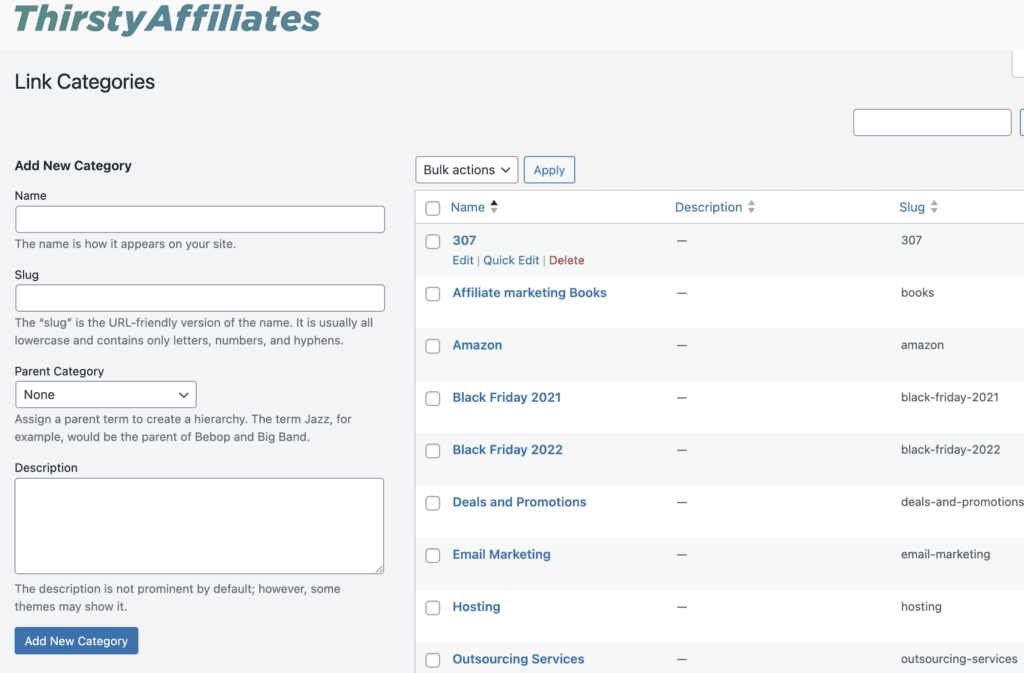
Este sistema me evita cometer errores. Nunca creo accidentalmente un enlace duplicado porque puedo ver lo que ya tengo.
Y lo que es más importante, facilita las actualizaciones. Si una marca concreta cambia su programa de afiliación, no tengo que alarmarme. Acabo de abrir la carpeta de categorías de esa marca y puedo ver todos los enlaces asociados de un vistazo.
¿Quiere organizarse?
Si quieres ver cómo agrupar y ordenar tus enlaces de forma más eficaz, esta guía te guía paso a paso en el uso de las Categorías de enlaces.
Lea la guía Categorías de enlaces →3. Cómo la aparición constante de enlaces genera confianza en mi blog
Confíe en es la moneda de cambio más importante que tengo como bloguera. Si mis lectores no confían en mí, no harán clic en mis enlaces y, desde luego, no comprarán los productos que recomiendo.
Una de las formas más fáciles de perder esa confianza es utilizar enlaces “aterradores”.
Todos los hemos visto. Pasas el ratón por encima de un enlace y la URL es kilométrica, llena de números aleatorios, signos de interrogación y nombres de dominio extraños de los que nunca has oído hablar. Cuando un lector ve un enlace así, duda. Parece desordenado y, a veces, incluso inseguro.
En mi blog, nunca dejo que se vean esos enlaces en bruto.
En su lugar, utilizo un sistema llamado “enlace encubierto” para que cada enlace de afiliado tenga un aspecto ordenado, limpio y coherente. Tomo esa URL de seguimiento larga y desordenada y la convierto en algo que coincida con mi propio sitio web.
Así, en lugar de una confusa cadena de código, mis lectores ven algo sencillo como: myblog.com/go/nombre-producto
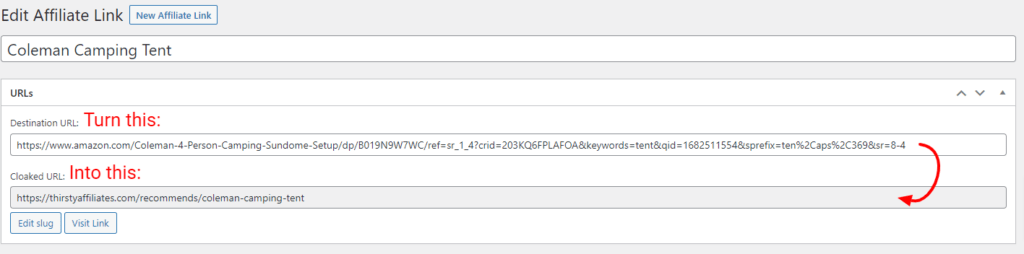
Yo utilizo ThirstyAffiliates para gestionar esto automáticamente. Actúa como una máscara, cubriendo el feo código de seguimiento con un enlace limpio que utiliza mi propio nombre de dominio.
Esto hace dos cosas importantes para mi sitio:
- Parece profesional. Todos los enlaces siguen el mismo patrón, por lo que los lectores se acostumbran a verlos.
- Elimina el miedo. Como el enlace lleva el nombre de mi sitio web, le dice al lector: “He puesto esto aquí intencionadamente. Es seguro”.
Al mantener una apariencia coherente, los enlaces parecen una parte natural de mi contenido y no un anuncio que acabo de pegar.
¿Cómo dar un aspecto profesional a tus enlaces?
Si desea establecer enlaces profesionales y de marca para su sitio, puede leer la guía sobre Link Cloaking aquí.
Lee la guía de Link Cloaking →
4. Cómo detecto enlaces de afiliados rotos u obsoletos
A la gente le encanta llamar al marketing de afiliación “ingresos pasivos”. Pero la verdad es que, si ignoras por completo tus enlaces, con el tiempo dejarán de funcionar.
Programas de afiliación cambian constantemente. Un producto que recomendé hace tres años puede agotarse. Una empresa puede cambiar la estructura de su sitio web o un programa de afiliación puede cerrar por completo.
Si se rompe un enlace de un post popular de 2021, puedo perder meses de comisiones antes de darme cuenta de que algo va mal.
Antes, la única forma de descubrir enlaces rotos era cuando un lector me enviaba un correo electrónico para quejarse, o cuando notaba que mis ingresos habían bajado de repente. Era una forma de trabajar estresante.
Ahora tengo un sistema que comprueba mi trabajo por mí.
Confío en el sistema automático Comprobador de enlaces 404 dentro de ThirstyAffiliates. Funciona como un guardia de seguridad, patrullando mi blog 24 horas al día, 7 días a la semana. Comprueba periódicamente mis enlaces para asegurarse de que realmente conducen a alguna parte.
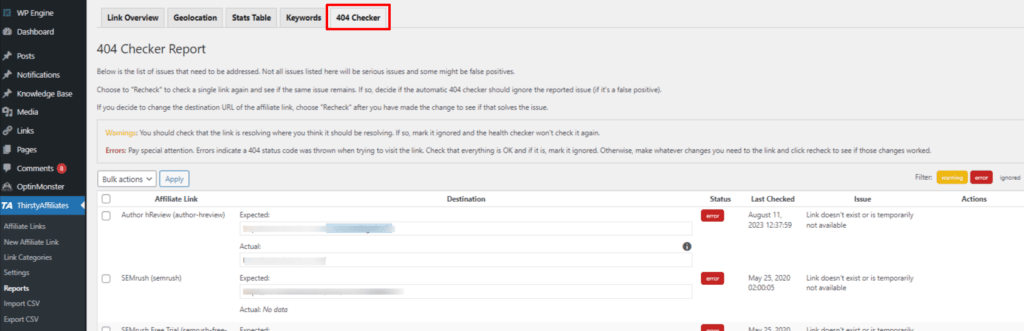
Si un enlace está muerto (o muestra un “error 404”), el sistema lo marca inmediatamente. Recibo una notificación que me indica exactamente qué enlace está roto y en qué entrada del blog se encuentra.
Esto me permite solucionar el problema al instante, normalmente cambiando el enlace o redirigiéndolo a un producto similar, antes de que me cueste dinero real. Convierte un desastre potencial en una solución rápida de cinco minutos.
Deje de perder ingresos
Si desea automatizar el mantenimiento de sus enlaces, puede informarse sobre el Comprobador automático de enlaces 404 aquí.
Obtenga más información sobre el comprobador automático de enlaces 404 →...5. Cómo utilizo los clics en enlaces para decidir en qué contenido centrarme a continuación
Durante mucho tiempo, medí el éxito de las entradas de mi blog en función de una métrica: el tráfico. Si un artículo recibía muchas visitas, daba por hecho que era un éxito.
Pero a medida que me adentraba en el marketing de afiliación, Aprendí que el tráfico sólo cuenta la mitad de la historia. Un post puede tener miles de lectores, pero si ninguno de ellos está interesado en los productos que estoy mencionando, no está haciendo su trabajo para mi negocio.
Necesitaba saber no sólo lo que la gente leía, sino también lo que leía. Atraer a con.
Ahora dejo que los datos tomen las decisiones editoriales por mí. En lugar de adivinar sobre qué escribir a continuación, miro qué enlaces de afiliados reciben más clics. Considero cada clic como un “voto” de mi audiencia, que me dice lo que realmente le interesa.
Utilizo los informes de ThirstyAffiliates para verlo con claridad.
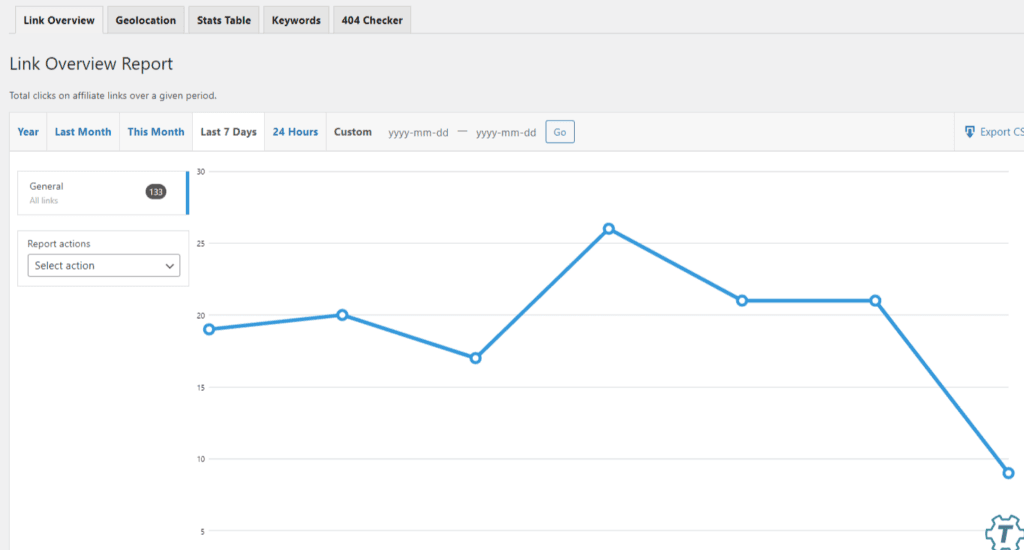
Estos datos cambian mi forma de planificar mi calendario de contenidos:
- Temas en expansión: Si noto un repentino aumento de clics en una herramienta específica que mencioné de pasada, lo tomo como una señal para escribir una reseña o tutorial completo y dedicado a esa herramienta.
- Contenido refrescante: Si veo un puesto de alto tráfico que no es generando clics, sé que tengo que volver atrás y ajustar cómo presento la oferta.
- Detectar tendencias: A veces los datos revelan que mi público está interesado en una categoría en la que ni siquiera había pensado centrarme.
Observando el datos del clic, Así dejo de perder el tiempo escribiendo posts que no van a ninguna parte. Así me aseguro de que, cuando me siento a escribir, estoy creando contenidos que mi público -y mi cuenta bancaria- realmente apreciarán.
¿Ves lo que funciona?
Si desea conocer mejor el comportamiento de su audiencia, consulte la documentación sobre Seguimiento de clics.
Explorar el seguimiento de clics →6. Cómo dejo de perder dinero de los lectores internacionales
Si consulto mis análisis, veo que me visitan lectores del Reino Unido, Canadá, Australia y otros países. Antes, si ponía un enlace a un producto de una tienda estadounidense, esos lectores internacionales hacían clic en el enlace, veían “No se envía a su país” y se marchaban.
Eso era tráfico desperdiciado. Yo hacía el trabajo de llevar al lector hasta allí, pero perdía la venta por un problema logístico.
Ahora utilizo un sistema llamado Geolocalización para solucionarlo automáticamente.
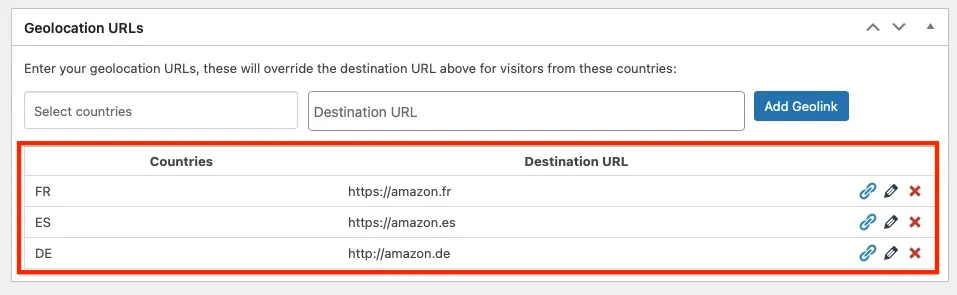
Entre bastidores, ThirstyAffiliates detecta desde dónde nos visitan los lectores. Si un lector de París hace clic en mi enlace, el sistema le redirige automáticamente a la versión francesa de esa tienda. Si un lector de Nueva York hace clic en mismo enlace, van a la tienda de EE.
No tengo que saturar las entradas de mi blog con texto desordenado como “Haga clic aquí para EE.UU. / Haga clic aquí para el Reino Unido”.” Sólo utilizo un enlace y el sistema clasifica el tráfico al instante. Es un pequeño ajuste que me ha permitido recuperar una cantidad sorprendente de ingresos que ni siquiera sabía que estaba perdiendo.
Globalización
Para saber cómo enviar automáticamente a los lectores al escaparate adecuado, lea la guía sobre Geolocalización.
Lea la guía Geolocalización →7. Cómo mantengo mis enlaces “seguros para Google” sin codificación
Google se preocupa mucho por los enlaces de afiliados. Para mantener mi ranking de búsqueda alto, tengo que seguir sus reglas, lo que significa etiquetar cada enlace de afiliado con atributos específicos como rel="nofollow" y rel="patrocinado".
Si tuviera que añadir esas etiquetas HTML manualmente a cada enlace de cada entrada, probablemente me olvidaría la mitad de las veces. Y el olvido podría perjudicar mi posicionamiento SEO.
Prefiero un sistema que garantice el cumplimiento por defecto.
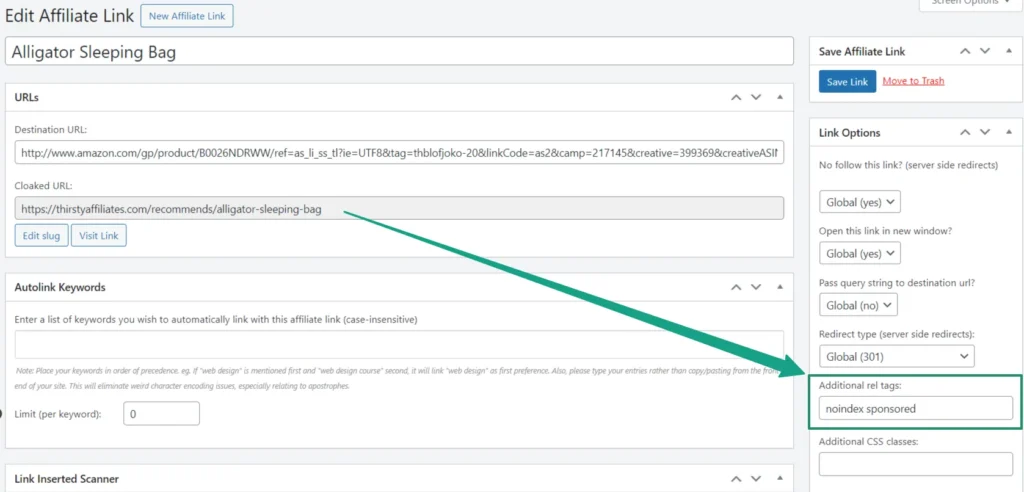
Configuré ThirstyAffiliates una vez, diciendo efectivamente, “Trate cada enlace de esta herramienta como un enlace patrocinado.” Ahora, cada vez que creo un nuevo enlace de afiliado, el sistema inserta automáticamente las etiquetas de código de Google correctas.
No tengo que pensar en Cumplimiento de las normas SEO cada vez que escribo. Yo escribo, y el sistema se encarga de los requisitos técnicos para mantener mi sitio en los buenos términos de Google.
Automatice su SEO
Si desea asegurarse de que sus enlaces siguen estrictamente las directrices de Google, consulte la configuración de una etiqueta rel “Noindex”.
Más información sobre la configuración de enlaces Noindex →8. Cómo manejo automáticamente los programas “estrictos” (como Amazon)
Algunos programas de afiliación tienen normas muy estrictas. La más importante es Asociados de Amazon. Le dicen explícitamente no para ocultar sus enlaces: quieren que el usuario sepa exactamente adónde va.
Esto solía darme quebraderos de cabeza. Quería utilizar ThirstyAffiliates para la organización y la presentación de informes, pero no podía utilizar la función de “encubrimiento” para los productos de Amazon sin arriesgarme a una prohibición.
Mi solución es una función llamada “Smart Uncloaking”.”
En mi sistema, puedo establecer reglas específicas para enlaces concretos. Si enlazo a una herramienta de software, lo oculto (le doy un aspecto bonito). Pero si enlazo a Amazon, marco una casilla que dice “Desenmascarar este enlace”.”
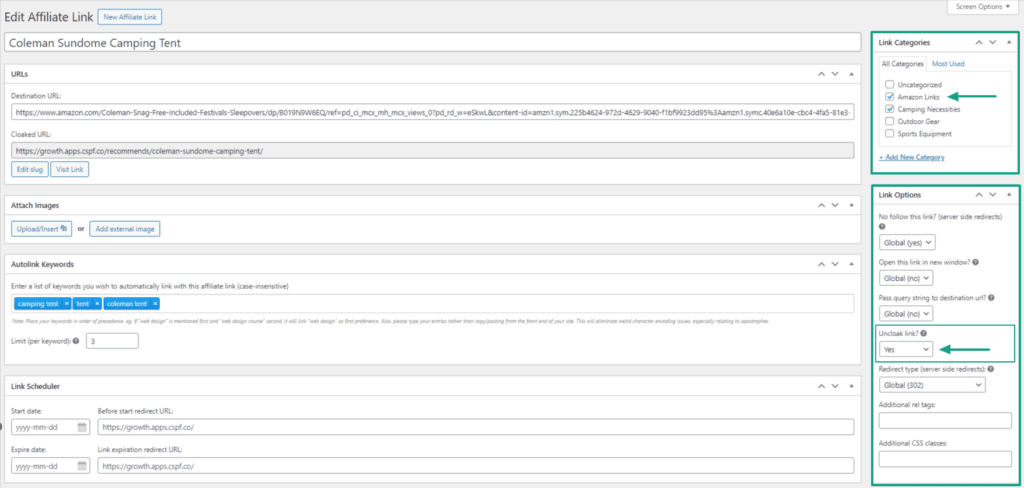
Esto me permite mantener el enlace dentro de mi sistema de gestión, de modo que sigo obteniendo los datos de los clics, la organización y el enlace automático, pero en la parte frontal, el lector ve la URL completa de Amazon, lo que me permite cumplir con sus condiciones de servicio.
Me ofrece lo mejor de ambos mundos: un sistema backend limpio para mí y una experiencia front-end conforme para Amazon.
Construir un sistema a largo plazo
Cuando miro hacia atrás y veo cómo solía gestionar mi marketing de afiliación, con hojas de cálculo desordenadas, notas adhesivas y mucho copiar y pegar manualmente, es increíble que haya ganado algo de dinero.
La lección más importante que he aprendido a lo largo de los años es que “esforzarse” no es suficiente. Puedes escribir el mejor contenido del mundo, pero si tus enlaces están rotos, desordenados o desorganizados, estás dejando dinero sobre la mesa.
Los sistemas que he presentado en este artículo no sólo permiten ahorrar tiempo, sino que también son escalables.
Como utilizo ThirstyAffiliates para que se encargue de los aspectos mecánicos -la organización, la segmentación geográfica, el cumplimiento de las normas y los controles de salud-, no tengo que preocuparme de la parte técnica de mi negocio. Puedo confiar en que el sistema funciona silenciosamente en segundo plano, optimizando mis ingresos mientras duermo.
Esta libertad me permite centrarme por completo en la única cosa que realmente hace crecer mi blog: crear contenidos útiles para mis lectores.
Si todavía gestionas tus enlaces de afiliado manualmente, te animo a que dejes de hacerlo. No te construyas un trabajo; crea un sistema.
¿Listo para construir su propio sistema?
Si desea profesionalizar su flujo de trabajo de afiliación, puede empezar con ThirstyAffiliates aquí.
Véase el precio de ThirstyAffiliates →Si tiene alguna pregunta o desea más información, hágamelo saber en la sección de comentarios.