Conteúdo

As postagens de comparação são um dos formatos de conteúdo mais valiosos que você pode publicar em um site afiliado. Eles também são um dos meus favoritos para escrever, porque o leitor está exatamente onde você quer que ele esteja - já comprando, já com uma lista restrita, apenas procurando ajuda para escolher entre duas opções específicas.
O afiliado que escrever a comparação mais genuinamente útil - aquela que realmente ajuda o leitor a decidir - ganha o clique. Para fazer isso, é preciso muita habilidade.
Este artigo é o passo a passo completo sobre como escrever cada camada de uma postagem de comparação, desde a primeira frase da introdução até o rastreamento que você configura para permitir que os dados decidam o verdadeiro vencedor.
Ao final, você deverá ter uma estrutura completa que poderá aplicar a todos os posts de comparação que escrever daqui para frente - e uma estrutura que garantirá a conversão de cada um deles.
O modelo de um artigo de comparação de produtos de afiliados
Todos os posts de comparação devem conter essas seções, aproximadamente nesta ordem:
- Introdução - os produtos exatos que estão sendo comparados
- Tabela de comparação - Visão geral rápida e digitalizável de ambos os produtos
- Seções frente a frente - Detalhamento por recurso, categoria por categoria
- Veredicto - sua recomendação final e honesta
- Colocação de links de afiliados - onde você realmente dirige cliques
Você pode mudar as coisas de lugar, adicionar seções ou cortar aquelas que não se aplicam aos seus produtos. Mas esses cinco componentes são as partes de sustentação da postagem. Se algum deles estiver faltando ou for fraco, o conjunto perderá oportunidades de conversão.
O restante deste guia aborda como escrever bem cada uma delas.
Como escrever a introdução
A apresentação é sua única oportunidade de manter o leitor na página. Eles já clicaram nos resultados da pesquisa, o que significa que confiam em você o suficiente para dar uma chance à sua postagem. mas apenas uma chance.
A maioria dos leitores decide, nos primeiros 10 a 15 segundos, se quer continuar lendo ou clicar no botão Voltar e procurar outra publicação. Sua introdução precisa chamar a atenção deles imediatamente.
As 3 funções de uma introdução de post de comparação
- Confirme ao leitor que ele está no lugar certo. A primeira frase deve mencionar os dois produtos pelo nome, e é ainda melhor se eles estiverem na mesma ordem. O leitor procurou por eles.
- Enquadre a decisão que eles estão tentando tomar. Por que as pessoas comparam esses dois produtos específicos? Qual é a pergunta subjacente que elas estão tentando responder? O ponto problemático que estão tentando resolver? Nomear essas perguntas explicitamente diz ao leitor que você o entende.
- Diga a eles o que levarão na bagagem. A introdução deve apresentar uma breve prévia da estrutura, informando que você analisará os recursos, os preços, a facilidade de uso e, por fim, fará uma recomendação. Os leitores permanecem nas postagens em que podem ver o caminho a seguir.
Faça essas três coisas corretamente e você ganhará o restante da postagem.
Criação da tabela de comparação
A tabela de comparação é o elemento visual mais importante de toda a sua postagem. É a primeira coisa que os leitores olham e, muitas vezes, é a única coisa com a qual alguns leitores se envolvem antes de saltar ou clicar.
Uma boa tabela de comparação deve ser capaz de sustentar a postagem por si só, ou seja, os leitores que apenas veio para dar uma olhada ainda deve sair com uma resposta clara apenas da mesa.
Escolhendo linhas que realmente se comparam
É tentador incluir todos os recursos que ambos os produtos oferecem em sua tabela de comparação, mas essa abordagem quase sempre é um tiro no pé.
Uma tabela com 20 linhas é esmagadora e faz com que os olhos do leitor fiquem vidrados antes de chegar às linhas que realmente o ajudariam a decidir.
As tabelas mais úteis são curtas, focadas e construídas em torno de diferenças. Se ambos os produtos oferecem a mesma coisa em uma determinada linha, essa linha não está fazendo um trabalho de comparação. É apenas um preenchimento.
Vale a pena incluir as linhas na maioria das tabelas de comparação:
- Preços - lista o preço de entrada ou a faixa de preço
- Melhor caso de uso ou usuário ideal - um resumo de uma linha sobre a quem se destina cada produto
- Recurso de destaque - o único recurso pelo qual cada produto é mais conhecido
- Diferenciais específicos - recursos que um produto oferece e que o outro não oferece
Procure manter um total de seis a nove linhas. Se a tabela começar a ficar mais longa do que isso, analise e corte tudo o que não estiver realmente ajudando o leitor a diferenciar os dois produtos.
Se deve declarar um vencedor na tabela
Alguns afiliados vão em frente e adicionam uma tag de “vencedor” em algum lugar da tabela de comparação - um pequeno emblema visual sobre qual produto vence no geral. Outros guardam o veredicto para o final da postagem.
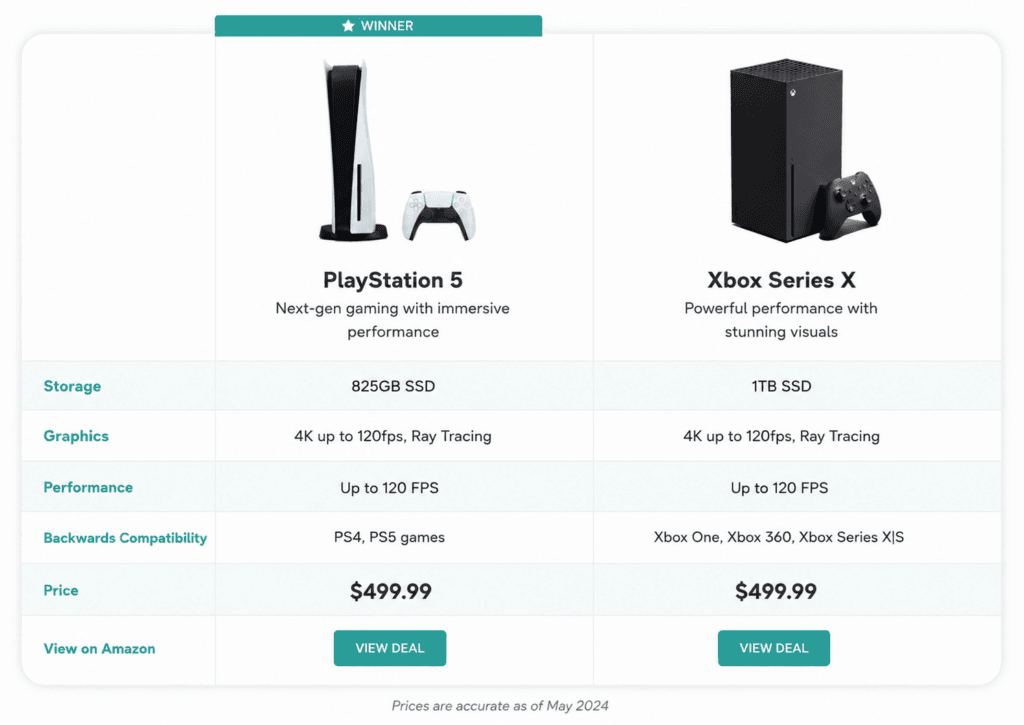
Minha opinião: uma única célula de “vencedor” na tabela pode funcionar se você quiser dar aos leitores a conclusão logo de início. Mas declarar um vencedor antes de mostrar seu raciocínio pode parecer prematuro e não incentiva o leitor a ler o restante da publicação.
Uma abordagem intermediária é rotular as linhas individuais com o produto vencedor de cada categoria. Isso fornece ao leitor informações direcionais sem achatar toda a comparação em um único veredicto antes que ele tenha adquirido contexto para isso.
Escrevendo as seções de cabeça a cabeça
As seções frente a frente são onde a maior parte da sua redação acontece. Também é nelas que você constrói o caso de sua recomendação final, uma categoria de cada vez.
Escolha de suas categorias de comparação
Decidir sobre o categorias que você estará comparando é uma das decisões estratégicas mais importantes que você tomará em toda a postagem, pois ela determina o que o leitor realmente vai pensar.
Uma boa postagem de comparação usa de 3 a 5 categorias. Menos de três parece pouco. Mais de cinco é cansativo e dilui cada seção individual. As categorias que você escolhe devem ser aquelas com as quais o leitor realmente se importa
A boa notícia é que você já fez a maior parte dessa reflexão quando criou sua tabela de comparação. As categorias que sua tabela está destacando geralmente são as mesmas às quais vale a pena dedicar uma seção de comparação.
Dependendo dos produtos ou especialmente serviços - Você pode considerar a inclusão de categorias adicionais, como integrações, escalabilidade, experiência móvel ou casos de uso específicos do setor.
A estrutura de uma única seção head-to-head
Dentro de cada seção de cabeça a cabeça, a estrutura deve ser consistente em toda a postagem. Eu escrevo todas as seções de cabeça a cabeça nesta ordem:
- Um enquadramento de uma frase do que é essa categoria e por que ela é importante para a decisão de compra
- O que o Produto A oferece nesta categoria - detalhes específicos e concretos
- O que o Produto B oferece nesta categoria - detalhes específicos e concretos
- Uma comparação direta de como eles se comparam uns aos outros
- Uma chamada vencedora - Qual deles vence essa categoria e por quê?
Esse tipo de estrutura repetitiva vai contra meus instintos em quase todos os outros tipos de escrita e, provavelmente, contra os seus também. As postagens de comparação são a exceção.
Essa é realmente a prática recomendada para esse formato - os leitores aprendem o ritmo na segunda seção e podem analisar o restante da postagem com eficiência a partir daí.
Isso também o obriga a escrever uma análise real na etapa 4, em vez de apenas descrever cada produto separadamente e presumir que o leitor irá compará-los em sua mente. Ele não fará isso.
Escrevendo o veredicto
O veredicto é a seção mais importante de toda a sua postagem. Tudo o que vem antes dela é um acúmulo.
O leitor rolou a tela, examinou a tabela, leu as seções comparativas e agora está aqui para obter a resposta.
O que você diz no veredicto determina se eles clique em seu link de afiliado ou fechar a guia e procurar outro artigo que lhes dê uma resposta mais clara.
Não faça hedge
A maior tentação ao escrever um veredicto é “proteger-se” - suavizar sua recomendação e dizer algo como “Ambos são ótimos produtos e realmente dependem de suas necessidades.”
Esse tipo de veredicto parece mais seguro de escrever. Você não pode estar errado se não disser nada. Mas isso não ajuda o leitor e, pior, na verdade o afasta de sua publicação.
Eles não vieram à sua postagem para obter permissão para fazer uma ou outra escolha. Elas vieram à sua postagem para obter uma recomendação. Uma resposta.
Um veredicto comedido diz a eles que, mesmo depois de ler 2.000 palavras de sua análise, você ainda não está disposto a escolher um lado. Então, eles vão procurar outra publicação que realmente tome uma posição.
Um veredicto claro, mesmo que outras pessoas possam discordar dele, é o que os leitores realmente querem.
O enquadramento “Quem deve escolher qual”
O padrão de veredito mais útil para postagens de comparação é o que chamo de enquadramento “quem deve escolher qual”.
Em vez de declarar um único vencedor geral e deixar os leitores cuja situação exige a outra opção sem ver, você divide sua recomendação por caso de uso.
Algo como:
“Para a maioria dos donos de cães que desejam apoiar a saúde das articulações de seus filhotes no dia a dia, o Produto A é a melhor escolha - é um produto para mastigar diariamente, mais acessível por dose e fácil de encontrar na maioria dos grandes varejistas de animais de estimação. Porém, se você estiver cuidando de um cão idoso com sérios problemas de mobilidade ou de uma raça propensa a problemas nas articulações, a fórmula de maior potência do produto B e a lista de ingredientes apoiada pelo veterinário valem o custo extra.”
Essa moldura faz três coisas ao mesmo tempo:
- Ele assume uma posição clara (o Produto A ganha para a maioria dos leitores)
- Ele recupera os leitores cuja situação favorece a outra opção
- Isso aumenta sua credibilidade como alguém que realmente entende os produtos
Quase todas as publicações de comparação que escrevo usam alguma versão desse enquadramento para o veredicto. É a maneira mais respeitosa com o leitor de fazer uma recomendação, e converte melhor do que qualquer outra estrutura de veredicto que já experimentei.
Colocação de seus links de afiliados e CTAs
Uma postagem de comparação que erra na estrutura de cliques desperdiça o trabalho que veio antes dela. Suas CTAs são a camada que determina se todo esse texto realmente rende comissão.
Onde as CTAs devem ir ao longo da postagem
Coloque as CTAs em vários pontos da publicação, não apenas no final. Um leitor que já tenha se decidido quando chegar à tabela de comparação não deve ter que rolar até o final para encontrar um link.
Aqui estão os locais mais influentes em seu conteúdo para inserir uma CTA:
- Na própria tabela de comparação - Geralmente como um botão ou link de texto em uma linha “Try It” (Experimente) ou “Visit Site” (Visite o site) na parte inferior de cada coluna de produto
- Na parte superior de cada seção de confronto direto - emparelhado com um display de produto (se você estiver usando um)
- Na seção de veredicto - CTAs diretas para o produto que você está recomendando, com uma CTA secundária para a alternativa
- Em um resumo final, o CTA - no final da postagem, geralmente como um bloco de botões lado a lado
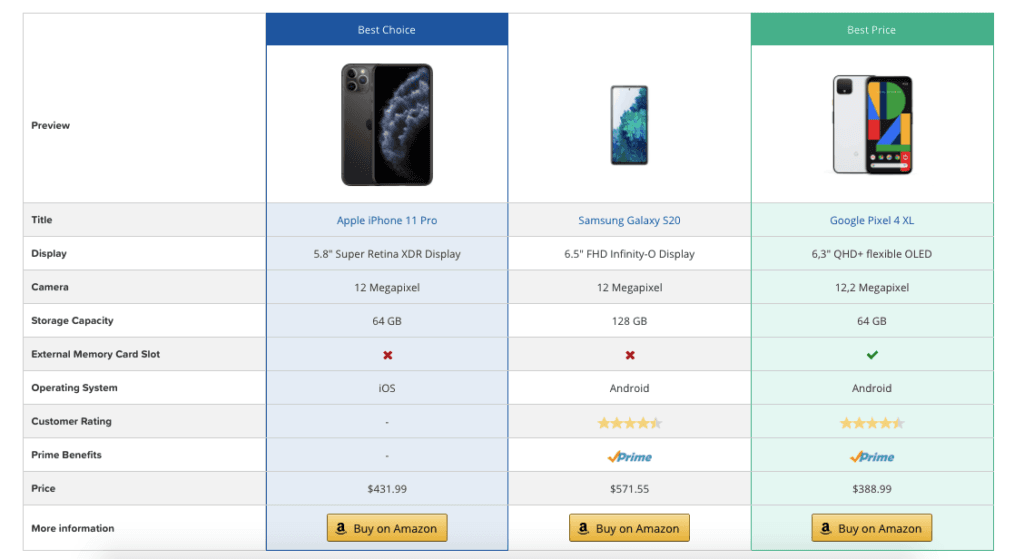
Normalmente, são de quatro a seis CTAs em toda a postagem, o que parece muito, mas não parece insistente quando os posicionamentos são naturais e o texto é variado.
Botões vs. links de texto vs. exibições de produtos
Na verdade, você tem três formatos de CTA para trabalhar em um post de comparação, e cada um deles tem uma função diferente.
- Botões Os CTAs se destacam e geram taxas de cliques mais altas, mas usá-los em todos os lugares faz com que a publicação pareça uma página de vendas. Use-os na tabela de comparação, na seção de veredicto e na CTA de resumo final - momentos em que você deseja dar ênfase visual máxima ao clique.
- Links de texto Os botões de navegação se misturam ao conteúdo e parecem mais naturais, mas são mais fáceis de serem rolados. Use-os dentro das seções comparativas, onde os botões interromperiam o fluxo da análise.
- Expositores de produtos ThirstyAffiliates são cartões visuais de produtos que combinam uma imagem, as principais especificações, o preço e um botão de CTA em um único bloco de marca. Eles são a melhor opção para ancorar a parte superior de cada seção comparativa, na qual você apresenta um produto específico antes de entrar na análise.
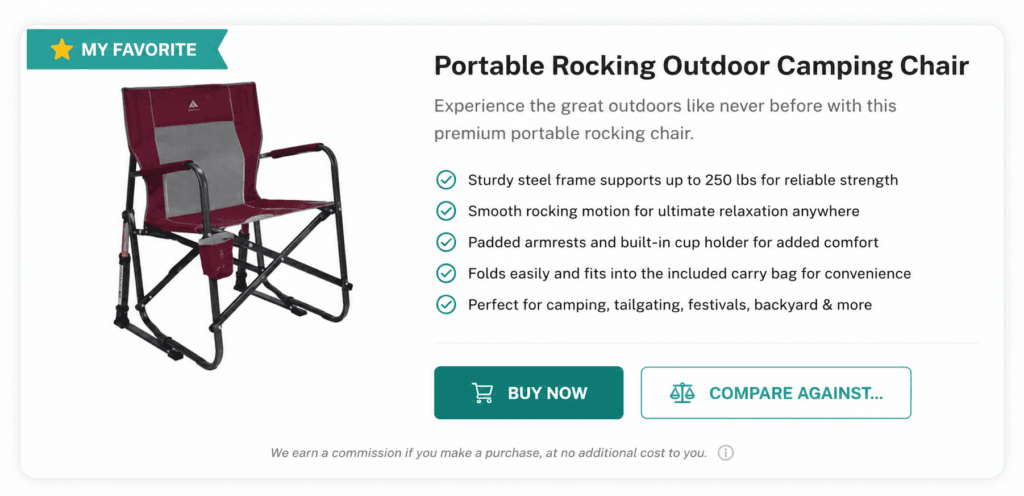
Construir um Exibição do produto ThirstyAffiliates para destacar seu principal produto recomendado com um emblema personalizado “Meu favorito” e, em seguida, associá-lo a uma CTA “Comprar agora” juntamente com um segundo botão que envia os leitores para seu artigo de comparação completo antes de comprarem.
Conclusão: Onde os posts de comparação valem a pena
Um post de comparação bem escrito é um dos fluxos de renda de menor manutenção que você pode criar em seu site de afiliados. Depois de publicado e classificado, a manutenção é mínima.
A postagem fica lá e ganha silenciosamente uma comissão toda vez que um leitor entra nela, percorre sua análise e clica no produto que ganhou o veredicto.
Multiplique isso por um punhado de postagens de comparação bem escritas e você terá criado um portfólio de ganhos perenes que continua se pagando com o mínimo de esforço de sua parte.
Quando sua postagem estiver no ar, rastreamento de cliques é o que o transforma de um ganhador estático em um ganhador mais inteligente.
O rastreamento de cliques ThirstyAffiliates mostra qual dos dois produtos está realmente ganhando o clique - e esses dados devem moldar o que você promoverá daqui para frente, tanto nesse post quanto no restante de suas estratégias de marketing de afiliados.
De fato, escreva suas postagens de comparação com o ThirstyAffiliates e você terá as ferramentas para todo o fluxo de trabalho:
- Categorias de links para manter seus links de afiliados organizados à medida que sua biblioteca de posts cresce,
- Expositores de produtos para ancorar cada seção de confronto direto com um cartão visual da marca,
- Rastreamento de cliques para continuar ensinando a você quais produtos estão realmente ganhando o clique.
Deixe um comentário abaixo e me diga quais dois produtos você comparou recentemente e se os dados de cliques confirmaram seu veredicto (ou o surpreendeu). Os dados pós-publicação são a metade da diversão!